In compliance with a recent U.S. Treasury (OFAC) regulatory change, TOEFL and GRE testing within Iran has been paused effective immediately. Iranian nationals may continue to test outside Iran where testing is available. Affected test takers will be contacted directly regarding cancellations and next steps. [Find out more]
Your At Home Test Day
If you’re taking the TOEFL iBT® Home Edition test, learn what to expect on test day and what to do before and during your testing session to make sure you have the best experience.
On this page, you’ll learn how to:
- Prepare your testing area.
- Check-in.
- Interact with your test proctor (the person who will be overseeing your test session).
- Solve and prevent technical issues and more!
Are you a Test Taker in Mainland China? For policies and procedures specific to Mainland China, visit https://toefl.cn/at-home.
Home Edition Testing Tools
Home Edition Testing Videos
Watch the videos below to help you prepare for testing at home.

Before your test session begins
- After you register for the test, verify your identity as soon as possible using the Entrust IDVaaS app, if applicable to you.
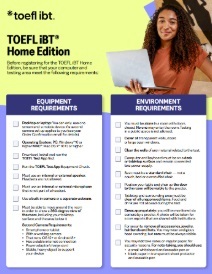
- Make sure your testing area meets all equipment and environment requirements, such as:
- Clear your testing environment of all items. Make sure you have a chair and solid work surface. Close all doors and cover any windows to minimize distractions.
- Whether you’re testing on a desktop or laptop, your computer should be plugged into a power source.
- Close all applications and any unnecessary browser windows or tabs on your computer. This can help prevent bandwidth issues while you test.
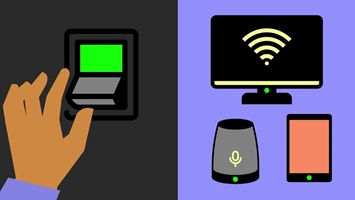
- Stop, close or shut down any other devices in your household that may use significant internet bandwidth while you’re testing.
- Gather the materials you'll need for your test session. These are the only materials permitted:
- Passport, government ID, or driver’s license. See ID requirements.
- If you take notes, you must use an erasable marker and write on either a whiteboard or a blank sheet of paper inside a transparent sheet protector.
- A mobile device to use as a second camera when applicable.
- Practice setting up your second camera as shown in the video above, if applicable to you.
- Dress appropriately, with your ears and face visible to the proctor. Avoid wearing any jewelry or other accessories. Face masks are prohibited during check-in or any part of your at home testing experience.
Is there anything I can do ahead of time to prevent issues?
- Bandwidth issues can prevent a successful testing experience. Before starting your test, close or shut down any other devices that may be using significant internet bandwidth.
- Close all browsers and applications not needed for the test. This can help prevent bandwidth issues while you test.
- Disable any screen-sharing or remote-access software prior to the test. You’ll need to keep it disabled throughout the test and set it so the software won’t open automatically during the test.
For additional information and troubleshooting help, visit the Equipment and Environment Requirements page.
What if I have an issue right before my test starts?
Your equipment will be checked again right before you test. The test proctor will tell you if there are any issues, and you’ll have an opportunity to resolve those issues before the test begins.
If I have a technical issue, will my start time be extended?
Your equipment will be checked by the proctor before you begin the test. The timer for your test will not start until after your equipment is checked and you begin the test.
What if I have a technical issue during my test?
If you have a technical issue during your test, speak and wave to get the proctor's attention. If you still have internet access but have been disconnected from the test, notify the proctor via the chat function.
What if I lose internet during the test?
If you lose your internet connection momentarily, you'll automatically be reconnected to the proctor when your connection is restored. If your exam can be reopened, your proctor will do so for you.
If you can't reconnect to your test or the proctor, restart the check in process.
What happens if the second camera disconnects during the test?
- During check-in: You will be prompted to rescan the QR code using your mobile device.
During the test: The proctor will temporarily stop your exam and give you instructions on how to reconnect your mobile device.
During your test session
After you select Start Test from “Your TOEFL Order Confirmation” email or from the My TOEFL Home dashboard, the TOEFL Test App will launch automatically. Then, here’s what you’ll do:
- Enter a virtual waiting room where you will see your test details and start checking in.
- Connect your second camera, if applicable.
Complete a proctor-assisted identity verification process.
Scan your room for the proctor.
Immediately before beginning your test, you’ll walk through one more equipment check with the proctor, who will attempt to assist in troubleshooting any issues.
To ensure your test day goes well, follow the procedures listed in the Bulletin, including the important rules below. If you don’t follow these rules, your test scores can be canceled, and your registration fee will not be refunded.
- Don't communicate with anyone other than the proctor.
- Don't use any unauthorized materials, including personal recording devices, unauthorized mobile devices, smartwatches, prewritten notes or textbooks at any time during the test.
- Certain behaviors will invalidate your test and can result in score cancelation. Avoid the following behaviors:
- Talking out loud to yourself.
- Looking away from the screen.
- Moving out of view of the webcam or second camera.
- Taking a break.
- Disable any screen-sharing or remote-access software (such as Zoom®, Skype®, TeamViewer®, Microsoft Teams®, Anydesk®, Apple Remote Desktop™, Grammarly® and Spell Check) prior to the test. These must remain disabled throughout the test. Make sure that the software won’t open automatically during the test.
- During the TOEFL test, you will see instructions about headset checks. Ignore these instructions, since headsets are not used or allowed when testing at home.
- ETS is monitoring reuse of devices and testing locations for unauthorized purposes. Frequent, inappropriate reuse of shared testing devices and common testing locations may result in score delay and/or score cancellation and could impact your eligibility to take future ETS tests.
- Submit the test, review your results if they are made available to you, and then close the TOEFL Test App.
- At the end of the test session, the proctor will ask you to erase the whiteboard or transparent sleeve and hold it up to the camera, showing the front and back.
- Once disconnected from the proctor, you may be asked to participate in a brief survey.
- The proctor will be available throughout your test via webcam and chat.
- If you need to contact the proctor during your test, speak to get their attention and/or select the chat icon to open the chat box. It may take a moment for the proctor to reply.
- If the proctor is attempting to chat with you, there will be an audio signal from the chat function.
- Make sure you can always be seen on camera.
At the end of the test, your Reading and Listening sections are scored instantly. These unofficial scores can give you an idea of how you did on the test. You can then choose to report or cancel your scores. See the Bulletin for details on what to consider before canceling.
After your test session
At the end of the test, the date that you can expect to receive your official scores will be displayed. It will also be shown in My TOEFL Home.